
 MailMaestro pricing
 TeamsMaestro pricing






Ask AI about your meetings
Now you can chat and get answers from all your meetings
Ever finished a week of back to back calls and tried to remember who you actually talked to, what you promised them, and when the next step is? Digging through notes, transcripts, and calendar invites to piece it all together is the kind of task that eats an afternoon.
That's the exact problem the new Ask AI feature in TeamsMaestro was built to solve. You can now chat with an assistant that knows the full context of your meetings, and get instant answers about a single call, a recurring series, or everything you've attended.
Ask across one meeting, a series, or all of them
The most useful part of Ask AI is the scope selector. Before you type a question, you pick what you want the AI to look at.
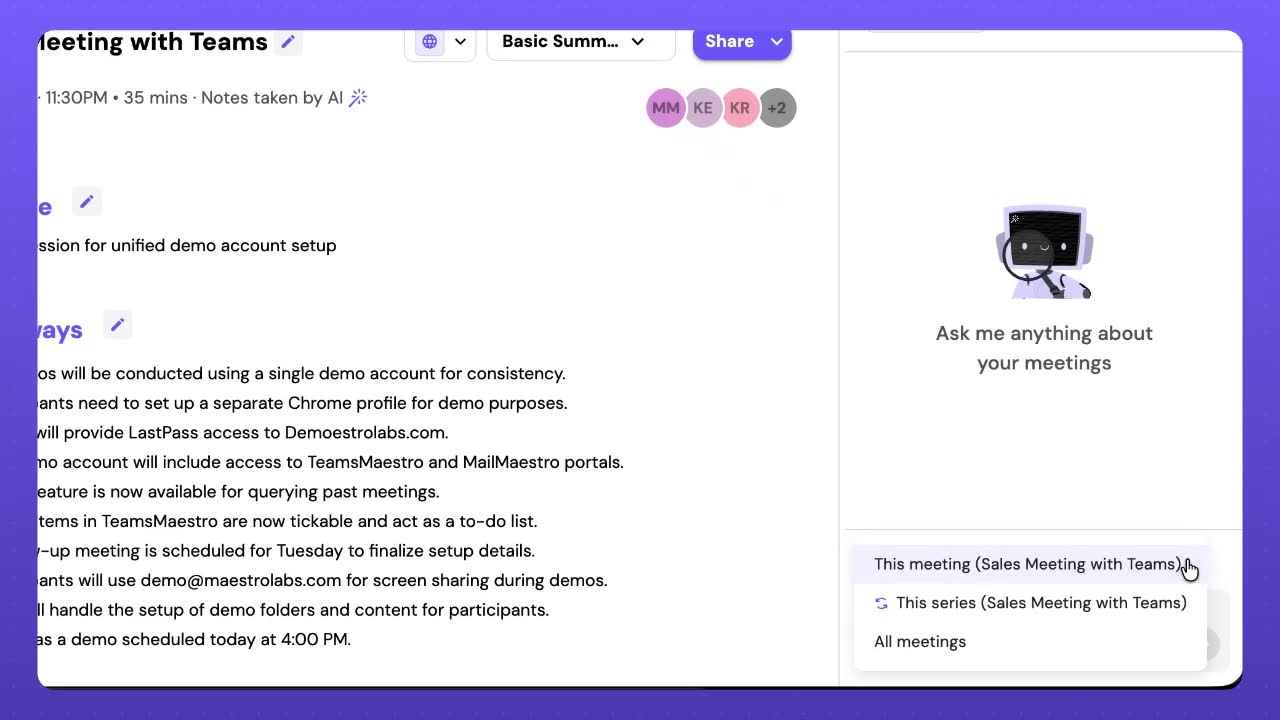
Three choices cover pretty much every situation. Pick This meeting when you're inside a single call and just want a quick recap or a clarification about what was said. Pick This series when you're in a recurring sync and want to see how a topic has evolved across weeks. Pick All meetings when you want to zoom out and find patterns across every call you've been part of.
That last one is where things get fun.
Turn a week of calls into a clean table
Here's a prompt straight from the demo. "Create a table with all the people I have done calls with last week. Include the topic of the call, the names, and date."
A few seconds later, you get this.
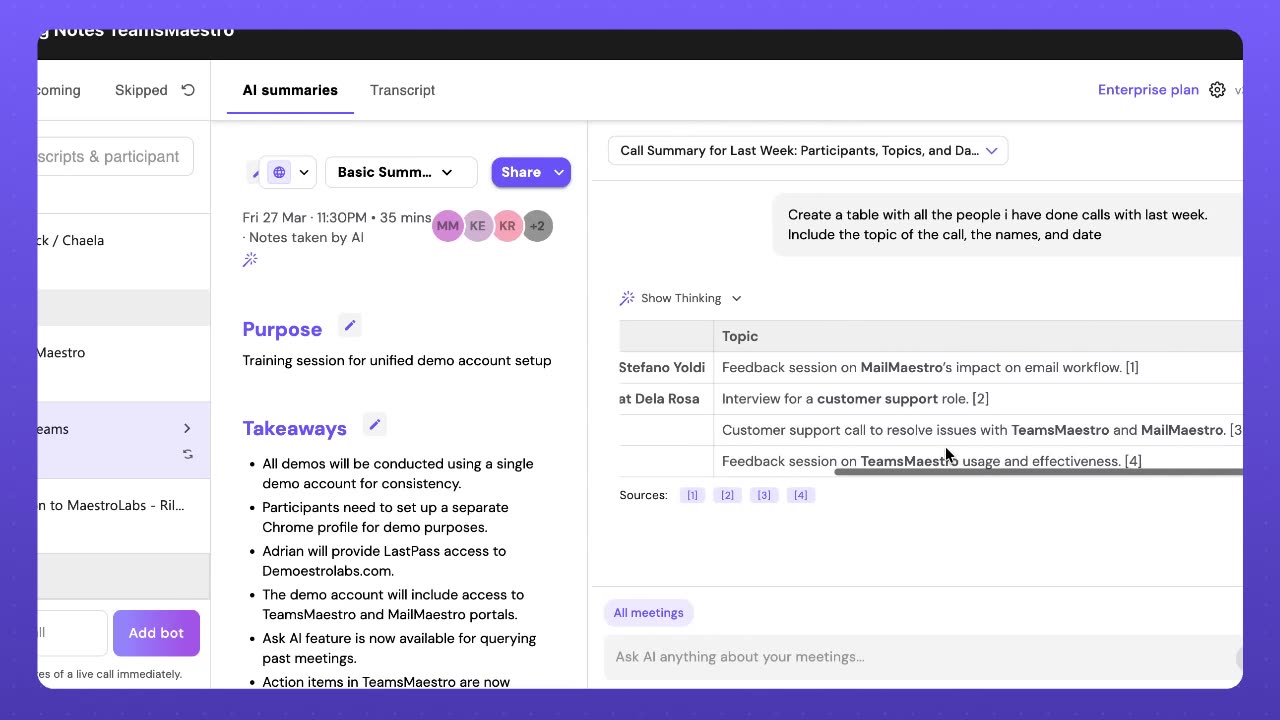
Dates, participants, topics, all structured in a way you can scan in seconds. No scrolling through individual meeting notes, no copy and paste, no asking a teammate what that Wednesday call was about.
Notice the little sources row at the bottom. Every answer Ask AI gives you comes with citations, and each one is clickable. Tap a source and you jump straight to the exact spot in the transcript or the summary where that claim came from. So if a row in that table looks wrong, or if you want to double check what was actually said, you're one click away from the original. No guessing whether the AI made something up, no hunting around for the right timestamp.
It's the kind of view you'd normally build yourself in a spreadsheet at the end of the week. Now it happens in one sentence, with receipts.
Your chat history, saved
Ask AI also keeps a running history of your previous conversations, grouped by Today, Yesterday, and Last Week. So when you have that moment of "wait, I already asked something like this," you can just scroll back and pick up where you left off.
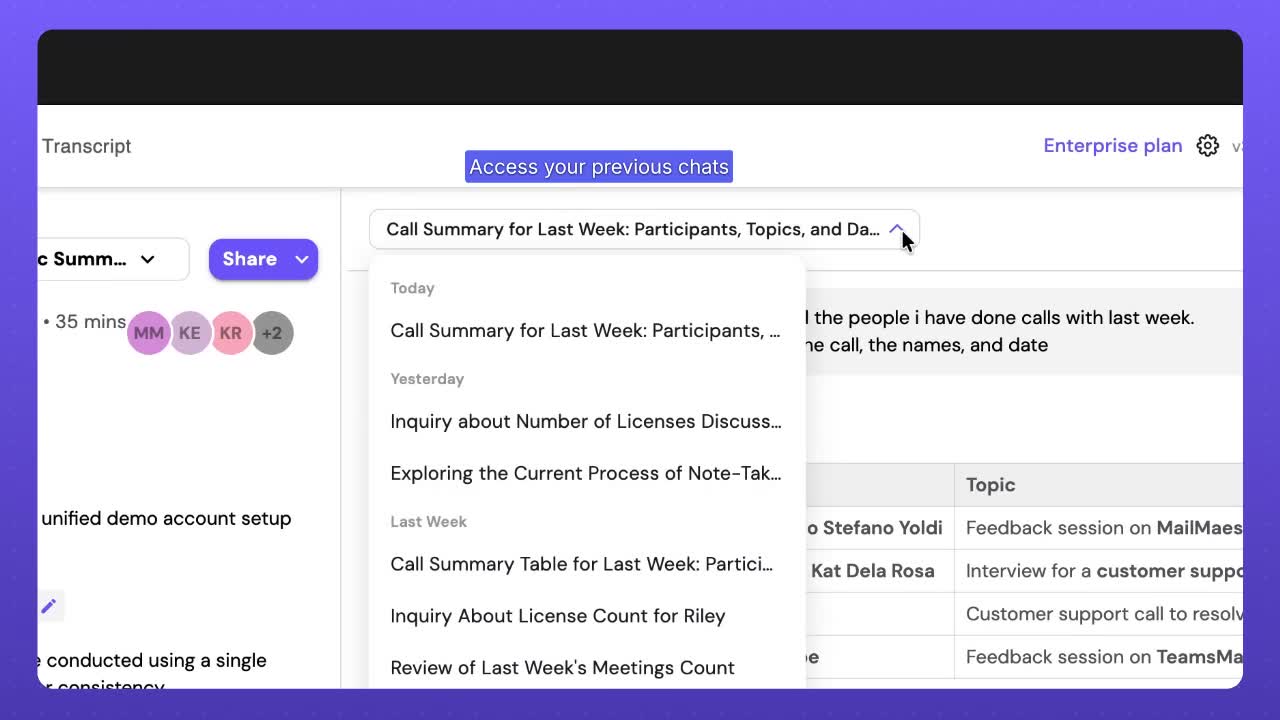
Small thing, big quality of life improvement. Especially if you're the kind of person who runs the same "what did I commit to this week" query every Friday afternoon.
Why this matters
Meeting notes are only useful if you can find what you need when you need it. Search helps, summaries help, but neither of them really answer the shape of question most of us actually have. Questions like "who have I met with this month and what was it about," or "did we decide anything about pricing in the last three calls with this account."
Those are the questions Ask AI is good at. You ask in plain English, it pulls from the transcripts and summaries across your meetings, and you get an answer that's already structured for how you think about the work.
Try it today
Ask AI is available in TeamsMaestro now, and it works alongside the tools you already use. Outlook, Google Meet, Teams, and Zoom are all supported, so whichever stack your company runs on, you're covered.
If you haven't tried TeamsMaestro yet, you can start for free and put Ask AI to work on your own meetings. Bring a question to your next Friday wrap up and see how fast it answers.
Languages we support
TeamsMaestro currently supports a wide range of languages for meeting summaries, transcripts, and AI responses — from English and Spanish to French, German, and many more. Our goal is to make every team’s communication experience seamless and inclusive, no matter the language.


If your preferred language isn’t supported yet, we’d love your feedback! Email us at feedback@maestrolabs.com to request new languages or share examples of what you’d like to see. Your input helps us shape the next updates of TeamsMaestro.
Final thoughts
Meeting summaries are no longer one-size-fits-all. With the Language and Template buttons in TeamsMaestro, you can create tailored, polished notes in seconds. Use these tools to communicate clearly, reduce follow-up work, and keep everyone aligned, wherever they are and however they work.
Languages we support
MailMaestro currently supports a growing range of languages for composing, summarizing, and improving your emails. From English and Spanish to French, German, and beyond — we’re expanding our capabilities to make AI communication accessible for everyone.
If your preferred language isn’t available yet, we’d love to hear from you! Email us at feedback@maestrolabs.com to request new language support or share specific examples. We’re continuously improving with your input.