

 MailMaestro pricing
 TeamsMaestro pricing




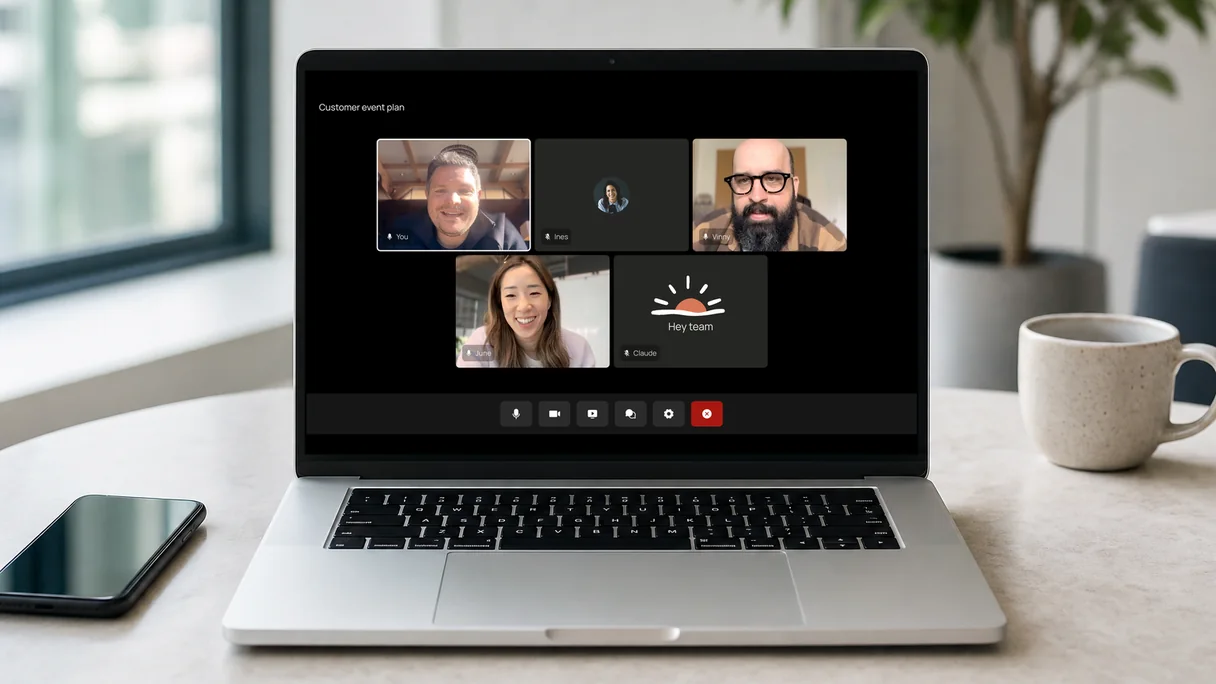
Claude Meetings or TeamsMaestro: which should you use?
Use Claude Meetings if your team already pays for Claude Team or Enterprise and meets in Google Meet. Use TeamsMaestro if your meetings run in Microsoft Teams, or if you want meeting notes without buying a Claude plan. The two do different jobs: Claude Meetings is a working assistant in an online call, and TeamsMaestro is a note taker that covers online calls on every platform and meetings in the room.
| Question | Claude Meetings | TeamsMaestro |
|---|---|---|
| Works in Microsoft Teams | Not yet | Yes |
| Works in Zoom | Not yet | Yes |
| Works in Google Meet | Yes | Yes |
| Records in-person meetings | No | Yes, app or MaestroGo |
| Answers questions and builds docs during the call | Yes | No |
| Notes, summary, and action items | Yes | Yes |
| Usable without a paid plan | No | Yes, 5 meetings a month |
| Calls with outside guests | Off by default | Yes |
| HIPAA with a signed BAA | Not in the beta | Enterprise plan |
Your company is on Claude Team or Enterprise, and you want Claude to draft, look things up, and build whiteboards while the call is running.
Or in Zoom, or a mix, or in the room. You want every meeting written up, including client calls and in-person meetings, and a free plan to start on.
Anthropic says support for other video platforms is coming soon. It has not given a date.
Can Claude take meeting notes or record meetings?
Yes, in Google Meet. Claude Meetings joins the call and writes notes, action items, and a transcript, but it does not keep an audio recording. In Microsoft Teams, Zoom, or an in-person meeting, Claude can only work from a transcript that another tool captured.
Without Claude Meetings, Claude does not join calls on its own. You can paste a transcript into a chat and ask for a summary, or connect a note taker such as TeamsMaestro so Claude can read your meeting notes directly. See using Claude with your Teams meeting notes.
Does Claude Meetings work with Microsoft Teams?
No, not yet. At launch Claude Meetings joins Google Meet calls only. Anthropic's announcement says support for other video conferencing platforms is coming soon, without naming Teams or Zoom and without a date.
That matters for most companies on Microsoft 365, where Teams is where meetings happen. Until Anthropic adds Teams, Claude can work with a Teams meeting only after the fact, from a transcript or notes that something else captured.
How TeamsMaestro joins a Teams call
TeamsMaestro is an AI note taker for Microsoft Teams. You install it from the Apps section in Microsoft Teams. It joins as a participant a few minutes before a meeting starts, either automatically from your connected calendar or when you invite it to a single meeting. It works in Teams on desktop, mobile, and the web. The same account also covers Zoom and Google Meet calls.
After the call, the transcript, summary, and action items are emailed to the organizer and the participants and stored in your TeamsMaestro workspace, where you can search them later.
Can Claude Meetings record in-person meetings?
No. Claude Meetings joins video calls, and for now only in Google Meet. A meeting around a table, a client visit, or a phone call has no call for Claude to join. TeamsMaestro records those too, in two ways.
- The TeamsMaestro mobile app: open it on your iPhone or Android phone, press record, and the phone's microphone captures the meeting. You get the same transcript, summary, and action items as for an online call. See the TeamsMaestro app.
- MaestroGo: a card-sized recorder, which we make, that sits on the back of your phone or on the table. It has four microphones, records phone calls, and syncs into the same TeamsMaestro account. It costs $119. See MaestroGo.
Either way, the meeting in the room ends up next to your Teams, Zoom, and Google Meet calls, with the same summary format and the same search.
What is Claude Meetings?
Claude Meetings brings Claude into a live video call as a visible participant. It follows the conversation, takes notes, and starts work while the meeting is still running. It is in beta and rolling out to Claude Team and Enterprise plans. On Team plans, inviting Claude is on by default and an admin can turn it off. On Enterprise, an admin turns it on for all or part of the organization.
During the call
- Questions: anyone on the call can ask Claude something out loud or in the chat. By default it answers in writing, and chat answers are visible to everyone on the call.
- Live work: Claude can build docs, whiteboards, and other artifacts while teammates on the invite edit them.
- Connected tools: Claude can look things up in tools a person has connected, after that person gives permission.
- Notes: it writes notes and action items, and can share a recap before the call ends.
After the call
Each meeting gets a page in claude.ai with the notes, the transcript, and anything Claude built. People from your organization who were invited can view and edit it. You can ask Claude about past meetings you attended and add Claude to upcoming ones from your calendar.
Anthropic lists Gong, Attention, Granola, Fireflies.ai, Otter, and Plaud as partners for sharing transcripts, and says those integrations are coming soon.
Claude Meetings vs TeamsMaestro compared
Both join the call as a participant and both leave you a transcript and notes. The differences are in where they work, what they do during the call, and what you need to pay for.
| Updated November 2026 | Claude MeetingsBeta | TeamsMaestroFree or $17 a seat |
|---|---|---|
| Status | Beta, rolling out | Generally available |
| Video platforms | Google MeetOthers "coming soon" | Microsoft Teams, Zoom, Google Meet |
| In-person meetings | NoJoins video calls only | YesTeamsMaestro mobile app or the MaestroGo recorder |
| How it joins | Visible participant, by invite or auto-join from your calendar | Participant, by invite or automatically from your calendar |
| Answers questions in the call | Yes, in chat | No |
| Builds docs and whiteboards live | Yes | No |
| Transcript, notes, action items | Yes | Yes |
| Where notes go | A meeting page in claude.ai | Email to all participants, plus your TeamsMaestro workspace |
| Audio kept | NoTranscript, summary, and screen descriptions only | 7 daysFor debugging, then deleted |
| Transcription languages | Not published | 40+ |
| Calls with outside guests | Stays out by defaultAn admin can allow it. Claude then stops replying in chat | Joins as usual |
| Plan needed | Claude Team or Enterprise | Free plan available |
| Integrations | Claude's connected toolsTranscript export to partners "coming soon" | MCP for Claude, ChatGPT, and Microsoft Copilot, plus a custom MCP server; Zapier, Make, Power Automate, and webhooks, which connect to more than 25 apps such as Salesforce, HubSpot, Pipedrive, Slack, Notion, Jira, Asana, and Google DrivePro plan. See all TeamsMaestro integrations |
| HIPAA with a BAA | Not available during the beta | Enterprise plan |
Claude Meetings details are from Anthropic's launch article, checked on November 13, 2026. TeamsMaestro details are from our pricing page and product page.
Is Claude Meetings free?
Claude Meetings has no price of its own, but it needs a paid Claude Team or Enterprise plan. During the beta, notes and transcripts on those plans are free. TeamsMaestro has a free plan and a Pro plan at $17 a seat a month, billed annually, with a 14-day Pro trial. See TeamsMaestro pricing.
Free for now, but expect to pay later. Anthropic says notes and transcripts are free "during the beta", which suggests they will be charged for once the beta ends. It has not said when that is or what they will cost. The free period for docs and whiteboards already has an end date: February 10, 2027. If you are choosing a note taker for the long term, budget for Claude Meetings becoming a paid feature.
What Claude Meetings costs during the beta
- Notes and transcripts: free on Team and Enterprise during the beta.
- Answers during the call: free, unless Claude uses a connected tool to answer. Those count toward your plan's usage.
- Docs, whiteboards, and other artifacts: free until February 10, 2027.
The plans themselves cost $20 a seat a month for a standard Team seat billed annually ($25 monthly), with a minimum of 2 seats. Enterprise starts at $20 a seat a month billed annually, with a 20-seat minimum and usage billed on top. Anthropic has not said what Claude Meetings will cost after the beta.
| Prices, November 2026 | Claude TeamStandard seat | TeamsMaestro Free | TeamsMaestro Pro |
|---|---|---|---|
| Price per seat | $20 a month, annual$25 billed monthly | $0 | $17 a month, annual$204 a year |
| Minimum seats | 2 | 1 | 1 |
| Meeting notes | Free during the beta, Google Meet only | 5 meetings a month | Unlimited |
| Also includes | Claude for chat, writing, code, and research | 50 meetings stored | Custom summaries, vocabulary, and integrations |
Claude prices are from Anthropic's pricing page. TeamsMaestro prices are from our pricing page. Both were checked on November 13, 2026.
Is Claude Meetings private and HIPAA compliant?
Claude Meetings stores no audio, stays out of calls with outside guests by default, and is not available to HIPAA-ready organizations during the beta. TeamsMaestro joins calls with clients as usual and offers HIPAA with a signed BAA on its Enterprise plan.
Claude Meetings
- No audio: Claude saves the transcript, the summary, and descriptions of shared screens, not the recording.
- Outside guests: by default Claude stays out of calls with people from outside your organization and leaves if one joins. An admin can change that. In those calls Claude does not reply in chat, and what guests say is still in the notes and transcript.
- Permissions: Claude uses each person's connected tools only with that person's permission, and confirms who is speaking before acting on a spoken request.
- Excluded during the beta: organizations with zero data retention, HIPAA-ready configurations, or customer-managed encryption keys.
Anthropic advises checking that everyone on the call accepts being transcribed before adding Claude or turning on auto-join.
TeamsMaestro
- Audits: SOC 2 Type II, and GDPR compliance.
- Audio: kept for 7 days for debugging, then deleted. Transcripts and notes stay in your workspace.
- HIPAA: available on the Enterprise plan, with a business associate agreement on request.
- Microsoft and Google: TeamsMaestro is listed in the Microsoft Teams Store and is Microsoft Attested and Google Verified.
- Admin controls: single sign-on, license management, and usage analytics on Enterprise.
The same consent rule applies to any note taker, ours included: tell people the meeting is being transcribed.
Where Claude Meetings and TeamsMaestro each win
Claude Meetings
Wins
- Answers questions during the call, using your connected tools.
- Builds docs and whiteboards live, which teammates can edit.
- No extra product to buy if your company already pays for Claude Team or Enterprise.
- No audio is stored.
Loses
- Google Meet only for now. No Microsoft Teams or Zoom.
- Online calls only. It cannot record a meeting in a room.
- Needs a paid Claude plan: at least 2 seats on Team, or 20 on Enterprise.
- Stays out of calls with outside guests by default.
- Not available to HIPAA-ready organizations during the beta.
- Beta pricing ends for docs and whiteboards on February 10, 2027, and later pricing is not announced.
TeamsMaestro
Wins
- Works in Microsoft Teams today, and in Zoom and Google Meet.
- Records in-person meetings too, with the mobile app or the MaestroGo recorder, into the same account.
- A free plan, with no other subscription needed.
- Notes go to everyone on the call by email, including people outside your company.
- HIPAA with a BAA on Enterprise.
- Connects to Claude through MCP, so you can ask Claude about your Teams meetings.
- Sends meeting notes to CRMs and work tools such as Salesforce, HubSpot, Slack, Notion, and Jira through Zapier, Make, or Power Automate.
Loses
- Does not answer questions or build documents during the call.
- The free plan stops at 5 meetings a month.
Can you use Claude with your Teams meeting notes?
Yes. TeamsMaestro Pro includes an MCP connection for Claude. Once it is connected, you can ask Claude about meetings that TeamsMaestro recorded in Teams, Zoom, or Google Meet, and use the notes in your Claude chats and projects.
That gives a team on Microsoft 365 most of what Claude Meetings promises after the call: summaries, follow-ups, and answers drawn from what was said. What it does not give you is Claude working live inside the Teams call. For that, you need Anthropic to add Teams support.
Setup takes a few minutes. Our guide on how to connect TeamsMaestro to Claude walks through it and shows how to turn meeting history into emails, briefings, and proposals.
Other AI note takers to compare
- Microsoft 365 Copilot writes meeting recaps inside Teams, as part of a paid Copilot license. See our Copilot meeting notes comparison.
- Fireflies.ai covers most video platforms and many CRMs. See TeamsMaestro vs Fireflies.
- Otter.ai is known for live transcription. See our Otter.ai alternative guide.
All of our comparisons are on the Compare page.
Who should use Claude Meetings, and who should use TeamsMaestro
Claude Meetings: frequently asked questions
Does Claude Meetings work with Microsoft Teams?
Not yet. At launch Claude Meetings supports Google Meet only. Anthropic says support for other video conferencing platforms is coming soon, but it has not named a date. To get AI meeting notes in Teams now, use a note taker built for Teams, such as TeamsMaestro, which we make.
Does Claude Meetings work with Zoom?
Not yet. Google Meet is the only supported platform during the beta. Anthropic says other platforms are coming soon.
Can Claude Meetings record in-person meetings?
No. Claude Meetings joins video calls only, and only in Google Meet for now. To record a meeting in a room, use a phone app or a recorder. TeamsMaestro, which we make, records in-person meetings with its mobile app or with the MaestroGo recorder ($119), into the same account as your online calls.
Is Claude Meetings free?
It needs a paid Claude Team or Enterprise plan. During the beta, notes and transcripts are free on those plans, answers in the call are free unless they use a connected tool, and docs and whiteboards are free until February 10, 2027. A standard Claude Team seat costs $20 a month billed annually, with a 2-seat minimum.
Can Claude take meeting notes?
Yes. With Claude Meetings, Claude joins a Google Meet call and writes notes, action items, and a transcript to a meeting page in claude.ai. Without Claude Meetings, Claude can summarize a transcript you give it, or read notes from a connected note taker such as TeamsMaestro through MCP.
Does Claude Meetings record audio?
No. Anthropic says Claude saves the transcript, the summary, and descriptions of shared screens, but not the audio.
Can Claude Meetings join calls with clients?
By default it stays out of calls with people from outside your organization and leaves if one joins. An admin can allow those calls. Claude then posts a notice in the chat, does not reply there, and still includes what guests say in the notes and transcript.
Is Claude Meetings HIPAA compliant?
Organizations with HIPAA-ready configurations cannot use Claude Meetings during the beta. TeamsMaestro offers HIPAA compliance with a business associate agreement on its Enterprise plan.
Claude Meetings vs Fireflies or Otter: what is the difference?
Fireflies and Otter are note takers that join calls on several platforms and add AI chat over your transcripts. Claude Meetings works only in Google Meet for now, but it can also build docs and whiteboards live during the call. Anthropic lists Fireflies and Otter as partners for sharing transcripts with Claude, with those integrations coming soon.
What is the best Claude Meetings alternative for Microsoft Teams?
A note taker that runs natively in Teams. TeamsMaestro, which we make, installs from the Teams app store, joins Teams calls automatically, and has a free plan. Its Pro plan connects to Claude through MCP, so you can still use Claude with your Teams meeting notes.
TeamsMaestro: AI meeting notes for Microsoft Teams, free to start
Install it in Teams, let it join your next call, and get the transcript, summary, and action items by email when the meeting ends.
Try TeamsMaestro free- Free for 5 meetings a month
- Teams, Zoom, Google Meet, and in person
- No card needed
Claude and Claude Meetings are trademarks of Anthropic. Microsoft Teams, Zoom, Google Meet, Fireflies.ai, and Otter.ai are trademarks of their owners. Features and prices were checked on November 13, 2026 and may have changed, especially while Claude Meetings is in beta.