









Improve email drafts with AI
Writing better emails has now become even simpler with MailMaestro's Improve email drafts with AI feature, designed to elevate the quality of your email communication!
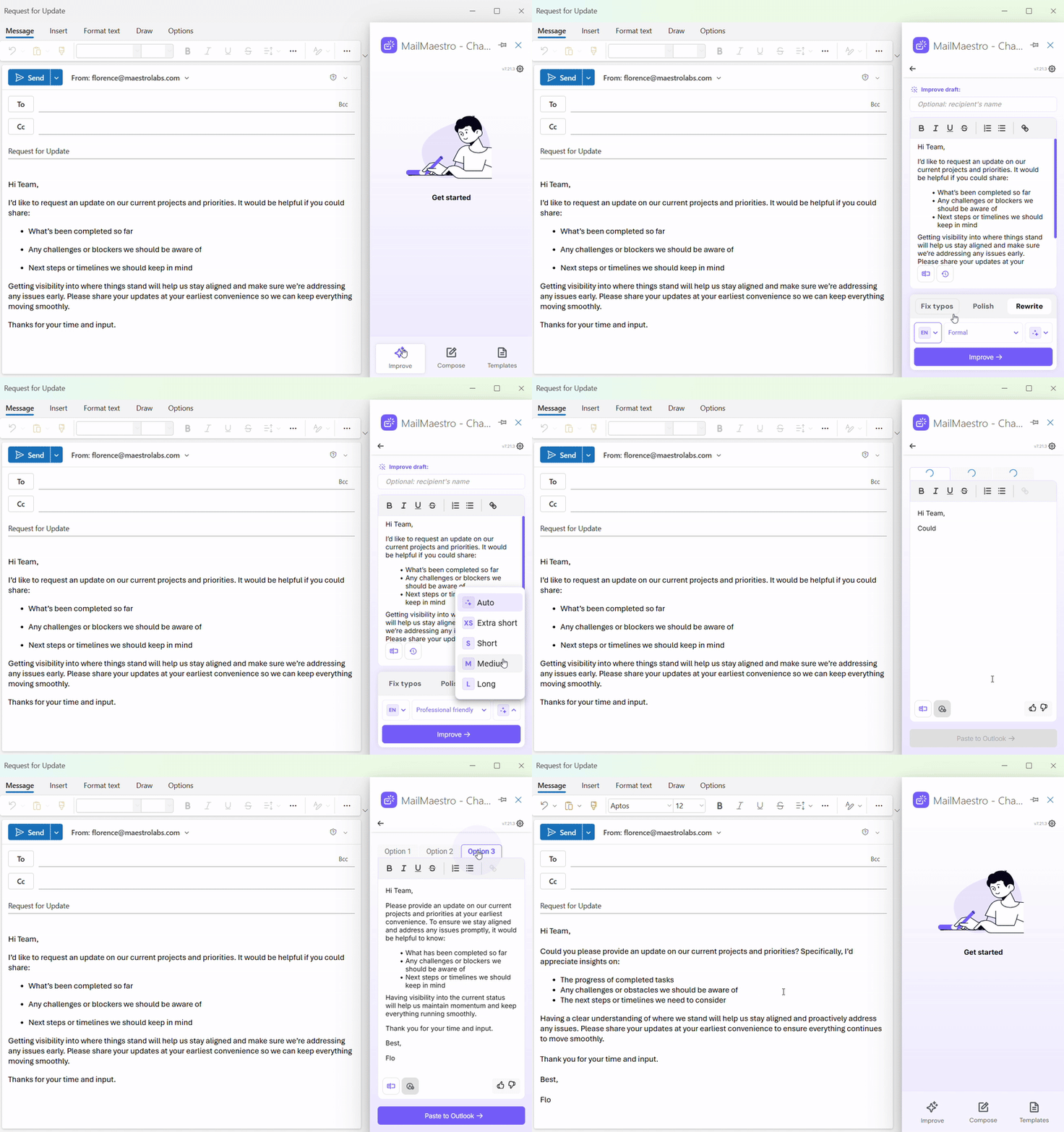
To access this feature, start writing your own email in your Outlook or Gmail window. Then, simply launch MailMaestro from your ribbon and select Improve draft. This button only appears if you have begun drafting an email. From here, you can write your draft and select your preferred language, tone, and length.
Once you’re content with your draft, hit the Improve button — and voila, your AI email assistant has now enhanced your message. The best part? You can refine it even further using our Improve selected text feature!
The Improve email draft with AI feature can:
- Make your emails more impactful: You can write a short email and let our AI work on making it more professional, adding appropriate email etiquette such as salutations and polite sign offs. Clear, concise, and impactful professional messages leave a lasting impression on your recipients.
- Save you time and effort: Instead of spending hours rewriting your draft until you get the perfect email, simply use the Improve draft feature and let the AI assistant do its magic and streamline your writing process.
- Provide you with a more seamless experience: The persistent sidebar remains by your side, offering continuous support throughout your email composition journey, in both your Outlook and Gmail clients.
Improve draft is your indispensable tool for crafting professional, persuasive, and error-free emails without breaking a sweat. As this is the first version of this feature, know that we're dedicated to improving based on your feedback.
Should you encounter any questions or require support, please don't hesitate to reach us at feedback@maestrolabs.com.
Languages we support
TeamsMaestro currently supports a wide range of languages for meeting summaries, transcripts, and AI responses — from English and Spanish to French, German, and many more. Our goal is to make every team’s communication experience seamless and inclusive, no matter the language.


If your preferred language isn’t supported yet, we’d love your feedback! Email us at feedback@maestrolabs.com to request new languages or share examples of what you’d like to see. Your input helps us shape the next updates of TeamsMaestro.
Final thoughts
Meeting summaries are no longer one-size-fits-all. With the Language and Template buttons in TeamsMaestro, you can create tailored, polished notes in seconds. Use these tools to communicate clearly, reduce follow-up work, and keep everyone aligned, wherever they are and however they work.
Languages we support
MailMaestro currently supports a growing range of languages for composing, summarizing, and improving your emails. From English and Spanish to French, German, and beyond — we’re expanding our capabilities to make AI communication accessible for everyone.
If your preferred language isn’t available yet, we’d love to hear from you! Email us at feedback@maestrolabs.com to request new language support or share specific examples. We’re continuously improving with your input.
Frequently Asked Questions


