












Key Takeaways
- Microsoft 365 subscription prices increased July 1, 2026, raising the all-in cost of Copilot for most teams.
- If your company has 300+ people, Microsoft forces you into Enterprise Copilot at $30/user/month annual. That is mandatory, not optional.
- MailMaestro is purpose-built for email. Copilot covers email plus Teams, Word, and Excel. MailMaestro only does the inbox.
- MailMaestro starts free. Paid plans from $12/user/month. No forced enterprise tier regardless of company size.
- If your main use case is email, you are paying for a lot of Copilot you won't use.
Microsoft's July 2026 pricing changes pushed a lot of teams to do the math. Base M365 subscription prices went up on July 1. For teams already paying for Copilot, the renewal notice landed with a higher number.
The question that came with it: are we actually using this for email?
If email is where most of your AI activity happens, this page is for you. It's a straight comparison of MailMaestro and Microsoft Copilot for one specific use case: writing, responding to, and managing email in Outlook.
What Microsoft Copilot actually costs in 2026
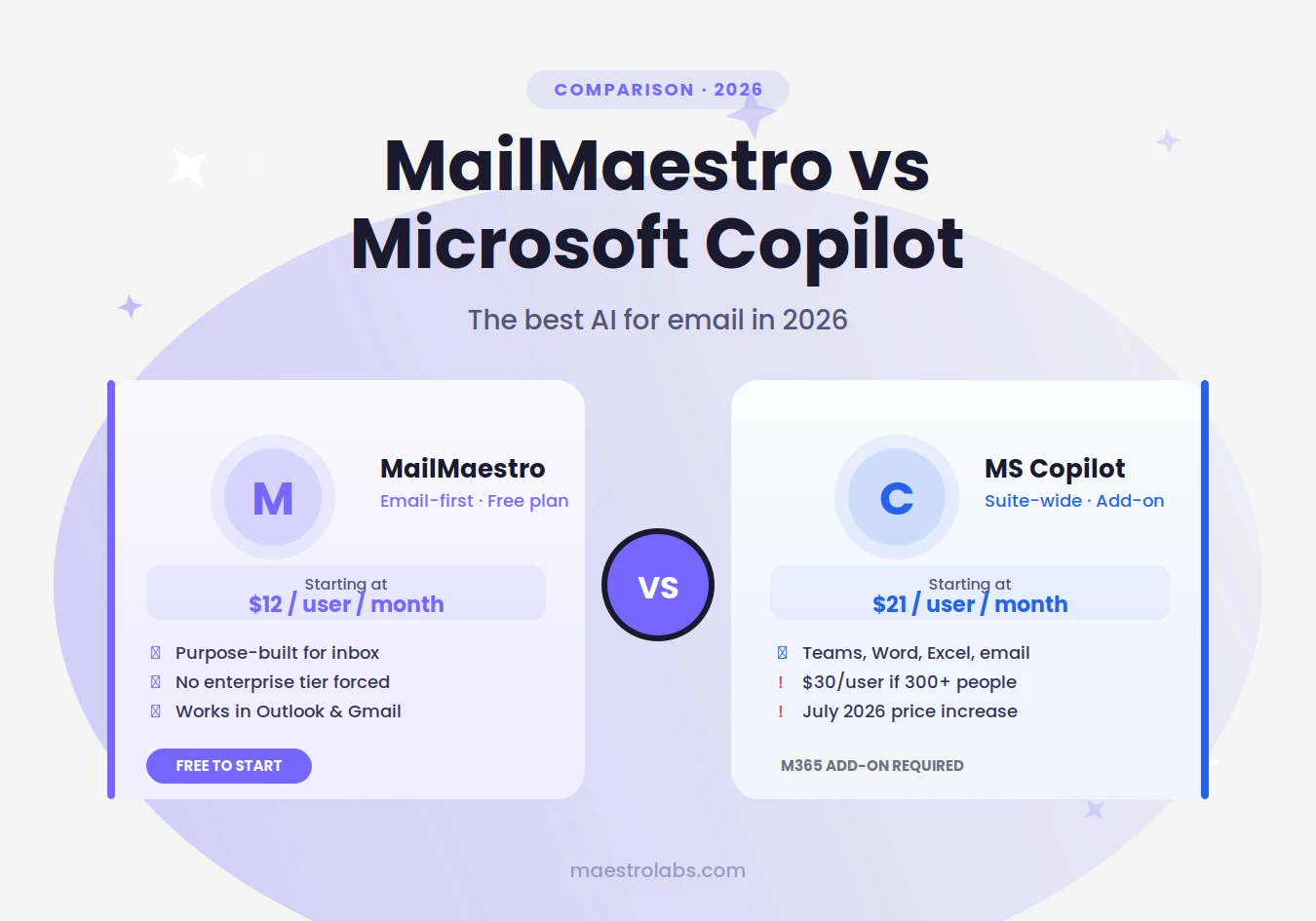
Microsoft Copilot is a paid add-on to a qualifying M365 plan. There are 2 tiers, and for larger teams, which one you're on isn't a choice.
Copilot Business (available up to 300 users):
- $21/user/month on an annual plan
- $25.20/user/month on a monthly plan
Copilot for Microsoft 365 — Enterprise (mandatory for 300+ users):
- $30/user/month on an annual plan
- $38.40/user/month on a monthly plan
The 300-user threshold is a hard cutoff. If your company has more than 300 employees, Microsoft doesn't let you stay on the Business tier. You are on Enterprise, at Enterprise pricing, whether your use case warrants it or not.
For a company of 400 people, that's $12,000/month on the annual plan just for the Copilot add-on. On a monthly plan it's $15,360/month. Before you've paid a cent for the underlying M365 subscription.
Smaller teams on monthly plans also face a significant premium: Copilot Business goes from $21 to $25.20, and Enterprise from $30 to $38.40 without an annual commitment. That's 40% more for the flexibility of not signing a year-long contract.
From July 1, 2026, M365 base subscription prices also increased, so the all-in cost went up further still. If your team is also evaluating Copilot Cowork for agentic tasks, that product uses separate token-based billing called Copilot Credits. See our Copilot Credits breakdown for what those cost.
What MailMaestro does vs what Copilot does for email
Both tools can draft emails, summarize threads, and suggest replies in Outlook. The difference is depth and focus.
Microsoft Copilot in Outlook handles drafting, thread summaries, and meeting prep. It's built into the Outlook ribbon and runs on the same AI that powers Teams, Word, and Excel. The email features work, but they share development priority with the full M365 suite.
MailMaestro is built specifically for email. It runs as a sidebar inside Outlook (and Gmail) and handles more than just drafting. It writes new emails from a short prompt, replies to threads with full context awareness, and summarizes long chains. Auto drafts generates reply suggestions before you even open a message. Auto labels organizes your inbox automatically. You can configure your writing style and set context about your role or company so the AI always sounds like you. Everything stays inside the inbox.
For most email use cases, purpose-built tools produce better results for that specific task than general-purpose AI applied to it.
Key differences: price, setup, and what you get
Price:
- Copilot Business (up to 300 users): $21/user/month annual, $25.20/user/month monthly
- Copilot Enterprise (300+ users, mandatory): $30/user/month annual, $38.40/user/month monthly
- MailMaestro: free to start; from $12/user/month on a monthly plan
Team size limits:
- Microsoft Copilot Business: capped at 300 users. Above that, Enterprise is required.
- MailMaestro: no forced tier based on team size
Setup:
- Microsoft Copilot: requires admin deployment and a qualifying M365 tenant license
- MailMaestro: installs as an Outlook add-in in 2 minutes; individual users can install without IT
Works without a Copilot license:
- Microsoft Copilot: No
- MailMaestro: Yes
Works in Gmail:
- Microsoft Copilot: No (Outlook only)
- MailMaestro: Yes
Email-specific features:
- Microsoft Copilot: drafting, thread summary, coaching
- MailMaestro: drafting, AI reply, thread summary, Auto drafts, Auto labels, style and context configuration
The setup difference matters more than most people expect. Microsoft Copilot requires your organization to have the right M365 plan enabled at the tenant level. Individual users cannot install it themselves. MailMaestro works at the individual level. Install the add-in and it works.
When Copilot makes sense (and when it does not)
Copilot is worth the cost when your team actively uses AI across several M365 apps. If someone uses Copilot to take notes in a Teams meeting, co-write a Word document, and get help with email in the same afternoon, the per-seat cost is easier to justify. If meeting notes are the primary use case, see our TeamsMaestro vs Microsoft Copilot comparison.
It's a harder case when:
- Email is the primary or only use case
- Your company has 300+ employees and Microsoft automatically pushes you into the $30/user/month Enterprise tier
- Budget is tighter after the July 2026 subscription increases
- Individual users want to try AI tools before a full company rollout
The Enterprise pricing is where it gets expensive fast. A 500-person team on annual Enterprise Copilot is paying $15,000/month for the add-on alone. If the main use case is email, that's a hard number to defend in any budget conversation.
MailMaestro covers all of these situations. The free tier lets you test whether AI actually changes your email workflow before committing to a per-seat license. Paid plans start from $12/user/month, and there's no company size threshold that forces you into a more expensive tier.
How to get MailMaestro in Outlook in 2 minutes
- Go to maestrolabs.com/ai-email-writer
- Click "Start for free in Outlook"
- Sign-up with your Microsoft SSO and follow the steps to install the Add-in.
- Type a short prompt. MailMaestro drafts the email.
No admin required for individual use. No credit card for the free tier. Works in both Outlook and Gmail.
MailMaestro writes the reply directly in Outlook. Add it free.
Lorem ipsum dolor sit amet, consectetur adipiscing elit. Suspendisse varius enim in eros elementum tristique. Duis cursus, mi quis viverra ornare, eros dolor interdum nulla, ut commodo diam libero vitae erat. Aenean faucibus nibh et justo cursus id rutrum lorem imperdiet. Nunc ut sem vitae risus tristique posuere.


follow-up on our previous call, ask if he’s ready to start cooperation let him know that our discount ends tomorrow ask him if he had time to calculate roi


