

 MailMaestro pricing
 TeamsMaestro pricing









Microsoft recently introduced new admin-approval requirements for apps accessing Microsoft Graph API. As a result, some users installing MailMaestro or TeamsMaestro may see an “Admin consent required” message and cannot use key features (email drafting, summaries, scheduling, meeting recordings, transcripts, etc.).
This article explains why approval is needed, why it’s safe, and exactly what your IT admin needs to do to enable full functionality.
Why approval is needed
During the onboarding of MailMaestro or TeamsMaestro, Microsoft may display an “Admin consent required” screen.
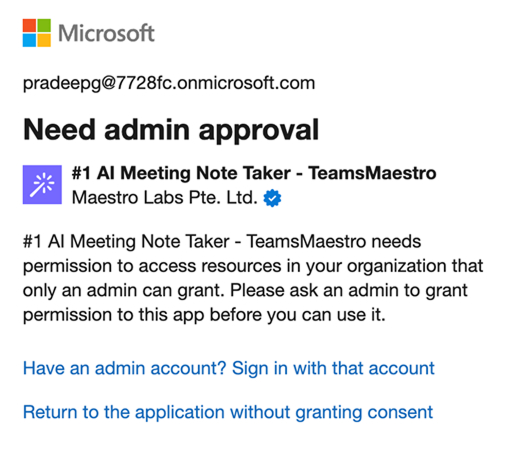
This means Microsoft needs an administrator to approve the app before it can access the required Microsoft Graph permissions.
This approval is required by Microsoft —not by Maestro Labs — and is common for any app that integrates with Outlook, Teams, or calendars.
Once approved, onboarding continues normally and all features become available.
Why It’s Safe to Approve
Maestro Labs takes security extremely seriously:
- SOC 2 Type II certified
- GDPR compliant
- HIPAA compliant
- No sensitive data is ever used to train AI model
- Data is processed securely through approved vendors
- Only the minimum Microsoft Graph permissions required for functionality are requested
These permissions let our apps access emails, calendars, or meeting data only to perform the features you choose to use.
It is safe — and necessary — for your IT team to approve these permissions so the apps can work correctly.
How IT Admins Can Grant Access
Admins can approve MailMaestro and TeamsMaestro in two simple ways: via direct approval links or via the Microsoft Entra Admin Center.
TeamsMaestro Approval
Option 1: Direct Admin Consent Link
- While logged into the correct Azure AD tenant with admin rights, open this link
- Review the permissions → Accept
Option 2: Through Microsoft Entra
- Go to Microsoft Entra admin center
- Navigate to Applications (left) → Enterprise applications
- Search for:
- App ID: 93f0e061-14d4-4626-b444-f5cfe0655f59, or
- Name: TeamsMaestro
- Open the app → go to Permissions
- Click Grant admin consent for your tenant
- Confirm
MailMaestro Approval
Option 1: Direct Admin Consent Link
- While logged into the correct Azure AD tenant with admin rights, open this link
- Review the permissions → Accept
Option 2: Through Microsoft Entra
- Go to Microsoft Entra admin center
- Navigate to Applications (left) → Enterprise applications
- Search for:
- App ID: 55b41c2c-e8d2-4c65-96e4-a67d5ab4e6a1, or
- Name: MailMaestro
- Open the app →Permissions
- Click Grant adminconsent
- Confirm
What Users Gain Once Approved
Granting access unlocks the full power of Maestro Labs tools:
MailMaestro
- AI email drafting& rewriting
- Summaries of longthreads or documents
- Quick tone or language switching
- Calendar invite creation
- Templates, shortcuts, and more
TeamsMaestro
- Auto-join or manual call recording
- AI meeting summaries
- Full transcripts & “Ask AI” Q&A
- Multilingual summaries
- Editing, sharing, team collaboration
- Zoom, Google Meet, and Teams support
Admins approving access ensures users get the productivity benefits they signed up for.
Need Help?
We’re here to support you.
👉 Schedule a demo
👉 Or email us anytime: support@maestrolabs.com
Lorem ipsum dolor sit amet, consectetur adipiscing elit. Suspendisse varius enim in eros elementum tristique. Duis cursus, mi quis viverra ornare, eros dolor interdum nulla, ut commodo diam libero vitae erat. Aenean faucibus nibh et justo cursus id rutrum lorem imperdiet. Nunc ut sem vitae risus tristique posuere.


follow-up on our previous call, ask if he’s ready to start cooperation let him know that our discount ends tomorrow ask him if he had time to calculate roi


