










Autodrafts: AI-Generated Replies Before You Even Open the Email
Autodrafts writes your email replies before you even open the email. No prompting needed — just open your inbox and find a ready-to-send response already waiting for you.
Every sales rep, account manager, and customer success professional knows the feeling: you open your inbox and there's a detailed, multi-question email waiting for a thoughtful reply. Writing that response takes time — time you don't always have. What if the perfect reply was already waiting for you?
That's exactly what MailMaestro's Autodrafts feature delivers.
What Are Autodrafts?
Autodrafts is a MailMaestro feature that automatically generates a high-quality draft reply the moment a new email lands in your inbox — before you've even clicked on it. No prompting, no back-and-forth with an AI chat window. Just open your email and find a ready-to-send (or lightly edit) response waiting for you.

It's the difference between reacting to your inbox and staying ahead of it.
See It in Action
The Incoming Request
Imagine you're Uswa Zarnab, Lead Product Designer at MaestroLabs. A prospect, Husnayn Shykh, has just emailed asking about MailMaestro pricing for a team of 20 users — and wants security details too.
Two questions. A warm lead. Time-sensitive.
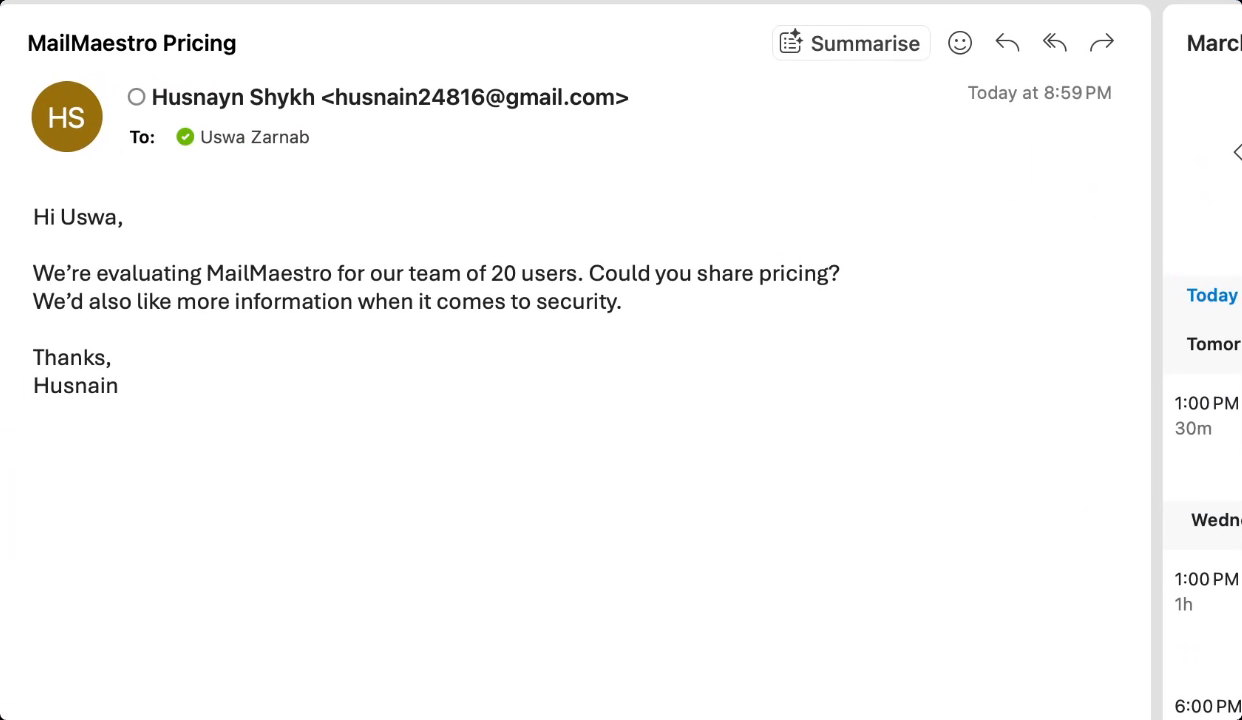
In a typical workflow, Uswa would need to open the email, parse the questions, look up pricing, find the security doc link, craft a personalized reply, and hit send. That's several minutes per email — multiplied across dozens of similar inquiries every week.
The Autodraft Appears Instantly
With MailMaestro, Uswa doesn't have to start from scratch. The moment that email hits her inbox, MailMaestro reads the thread and generates a tailored draft reply automatically. It even shows up labeled as a Draft in her inbox — ready and waiting.

No copy-pasting from a knowledge base. No digging through previous emails for pricing. MailMaestro handled all of that in the background.
A Complete, Professional Reply — Already Written
When Uswa opens the draft, she finds a fully composed reply that covers every point Husnayn raised:
- Pricing — both monthly ($15/user/month) and annual ($144/user/year) plans, clearly laid out
- Security — a direct link to maestrolabs.com/security so Husnayn can review everything in detail
- A next step — a proactive offer to schedule a 15-minute call to walk the team through security and onboarding
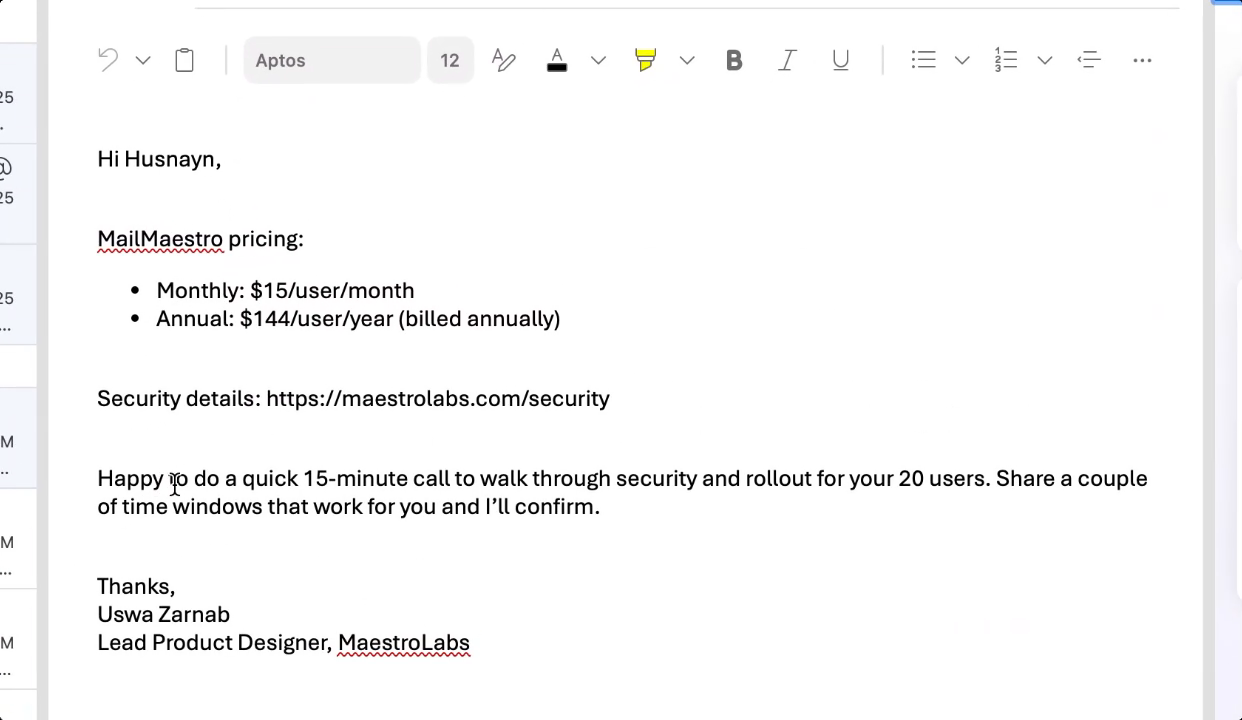
All Uswa needs to do is review, personalize if she wishes, and hit send. The whole process takes seconds instead of minutes.
Why Autodrafts Changes the Game
Speed Without Sacrificing Quality
Autodrafts doesn't produce generic, one-size-fits-all responses. It reads the context of the specific email — the questions asked, the tone, the relationship — and generates a reply that feels personal and on-point. Fast and good.
Always-On Responsiveness
Whether it's 9 AM or after hours, Autodrafts is working. Your prospects and customers get quicker responses, which builds trust and accelerates deals.
Reclaim Hours Every Week
Think about how many emails in your inbox are variations of the same few questions — pricing, availability, how-tos, follow-ups. Autodrafts handles the first draft of all of them, so you can focus your energy on the conversations that actually need your full attention.
Who Is Autodrafts Built For?
Autodrafts is ideal for anyone who lives in their inbox:
- Sales teams handling high volumes of inbound inquiries
- Customer success managers fielding repetitive support or onboarding questions
- Account executives managing multiple prospects at different stages
- Founders and executives who need to be responsive but can't afford to spend hours on email
Ready to Let MailMaestro Handle the First Draft?
Autodrafts is just one of the ways MailMaestro helps you move faster, communicate better, and reclaim time from your inbox. If your team is spending too many hours writing emails that could practically write themselves, it's time to give MailMaestro a try.
Languages we support
TeamsMaestro currently supports a wide range of languages for meeting summaries, transcripts, and AI responses — from English and Spanish to French, German, and many more. Our goal is to make every team’s communication experience seamless and inclusive, no matter the language.


If your preferred language isn’t supported yet, we’d love your feedback! Email us at feedback@maestrolabs.com to request new languages or share examples of what you’d like to see. Your input helps us shape the next updates of TeamsMaestro.
Final thoughts
Meeting summaries are no longer one-size-fits-all. With the Language and Template buttons in TeamsMaestro, you can create tailored, polished notes in seconds. Use these tools to communicate clearly, reduce follow-up work, and keep everyone aligned, wherever they are and however they work.
Languages we support
MailMaestro currently supports a growing range of languages for composing, summarizing, and improving your emails. From English and Spanish to French, German, and beyond — we’re expanding our capabilities to make AI communication accessible for everyone.
If your preferred language isn’t available yet, we’d love to hear from you! Email us at feedback@maestrolabs.com to request new language support or share specific examples. We’re continuously improving with your input.


