

 MailMaestro pricing
 TeamsMaestro pricing




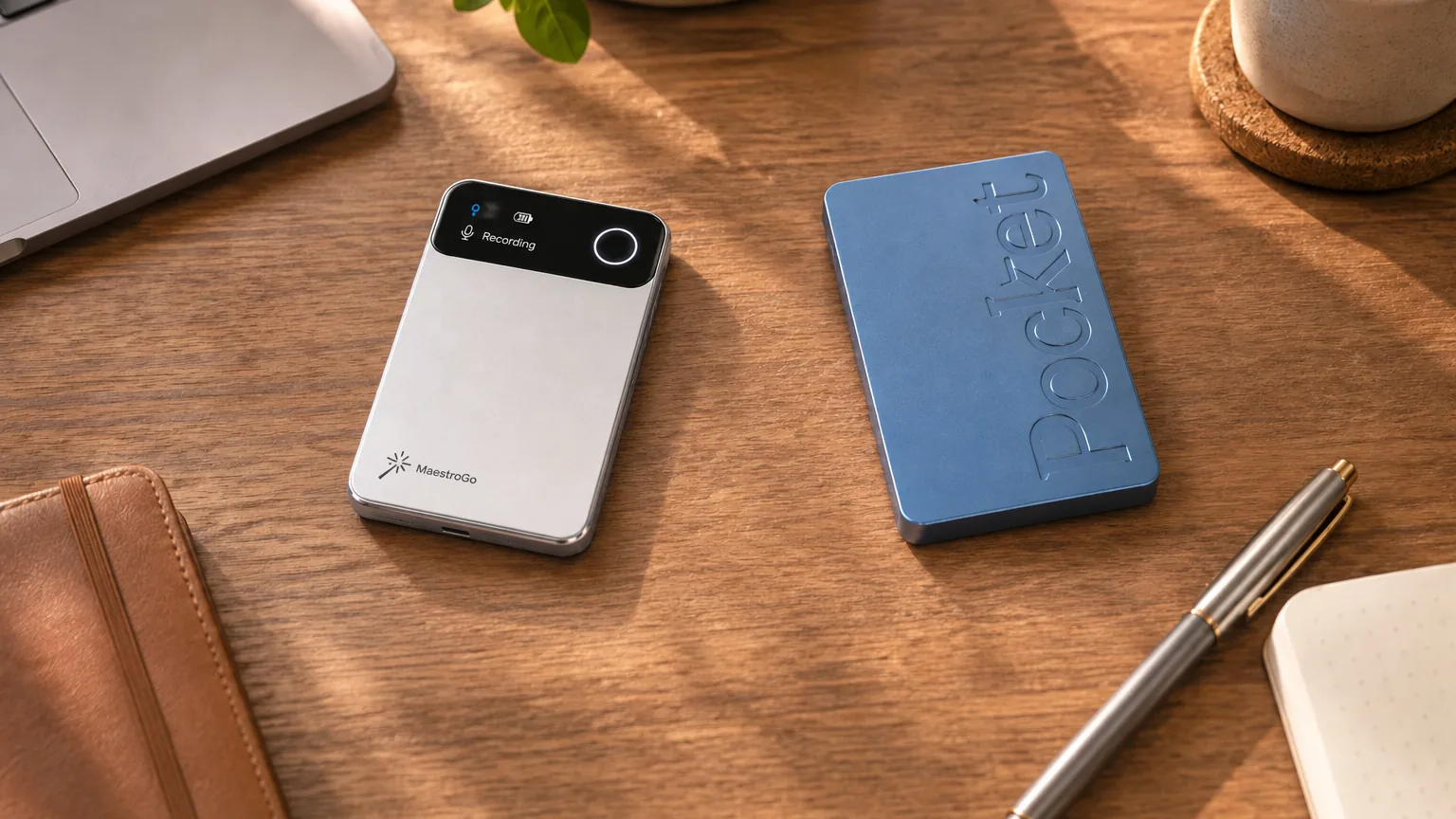
Is Pocket AI worth it?
Short answer: Pocket is worth it if you record many hours a month and only need recent notes, because its free plan has no monthly transcription limit. It is a weaker buy if you need summaries kept for good, the most accurate transcripts, automatic call detection or a published security audit.
| Area | Our read | Why |
|---|---|---|
| Price and free plan | Strong | $129 for the device, and unlimited transcription without paying. MaestroGo's free plan, by comparison, stops at 300 minutes a month. |
| Design and charging | Good | A magnetic back and USB-C. At 52 g it is on the heavy side for a card recorder, and it has no screen. |
| Transcription | Good | Accurate on clear speech. The free plan uses standard accuracy, and names and jargon slip. |
| Summaries | Good | Decisions and follow-ups come through well in structured talks. Long or chaotic sessions lose nuance. |
| Phone calls | Mixed | A contact microphone records both sides, but you switch to call mode by hand. |
| Online meetings | Mixed | A desktop app in beta records Zoom, Teams and Meet on your computer. There is no notetaker that joins the call. |
| Keeping your notes | Weak | Free summaries are deleted after 30 days. Keeping them costs $239.88 a year. |
| Privacy commitments | Mixed | Encrypted, and no AI training without consent. No published SOC 2 audit, and processing locations are not named. |
Many hours of meetings and calls a month, and you act on notes within a few weeks.
Summaries kept for good, speaker names and the best accuracy cost $239.88 a year.
MaestroGo detects calls on its own, has a screen and publishes a SOC 2 Type II audit.
What is Pocket AI, and is it legit?
Pocket, also sold as Pocket AI and HeyPocket, is a card-sized AI voice recorder. It records conversations in a room and both sides of phone calls, then its app writes a transcript, a summary and a to-do list. It is made by Open Vision Engineering, a San Francisco start-up, and it is a legitimate product with a large base of paying customers.
How does Pocket AI work?
You attach Pocket to the back of your phone or put it on the table, press the side button, and talk. It records to its own 64 GB of storage, so it keeps going without your phone. When the app is open again, the audio syncs, and Pocket's cloud transcribes and summarises it. Pocket markets itself as an "AI thought companion", so besides meetings and calls many owners use it for voice notes, ideas and personal reflections spoken on the go.
Who makes Pocket?
- Company: Open Vision Engineering, founded by Gabriel Dymowski and Akshay Narisetti, and part of Y Combinator.
- Funding: an $11 million round led by Accel, announced in mid-2026, with Y Combinator and individual investors.
- Scale: heypocket.com says Pocket has more than 400,000 customers.
- Customer reviews: 4.8 out of 5 on Trustpilot from about 7,900 reviews, with 91% at five stars.
"Legit" and "flawless" are different questions. The product does what it says, and the complaints in public reviews are mostly about delivery times, slow support replies and the price of Pocket Pro. They are covered under what owners say.
Pocket AI price: does it need a subscription?
No. Pocket works without a subscription, and its free plan transcribes without a monthly limit. What you pay for with Pocket Pro is keeping your summaries, better accuracy and automatic speaker names.
How much does Pocket AI cost per month?
Pocket costs $0 a month on the free plan, or $19.99 a month for Pocket Pro, billed yearly as $239.88. heypocket.com shows Pro only with yearly billing. The recorder itself is a one-time purchase.
How much is the Pocket recorder?
The Pocket recorder costs $129 on heypocket.com, a one-time purchase. Pocket runs frequent promotions, so you may find it for less. Shipping is free, returns are accepted for 30 days after delivery, and the warranty is one year. Check the current price before you buy, because it has changed several times.
Pocket free plan vs Pocket Pro
| Pocket plans, November 2026 | Free$0 | Pocket Pro$239.88 a year | BusinessPrice on request |
|---|---|---|---|
| Transcription | UnlimitedStandard accuracy | UnlimitedHighest accuracy | Unlimited |
| Summaries kept | 30 days | For good | For good |
| Speaker names | Manual | Detected automatically | Detected automatically |
| Ask Pocket (questions about your recordings) | 3 chats a dayUp to 3 messages each | UnlimitedPlus research reports and infographics | Unlimited |
| Live transcript while recording | No | Yes | Yes |
| Templates | Default summary | 80+ templates and custom ones | Custom workflows |
| Integrations | To-do and task apps | Adds Notion, Google Drive, OneDrive, Linear, Asana and ClickUp sync | Adds API keys and webhooks |
| Export | Text and audio | PDF, DOCX and Markdown, also in bulk | Audit and admin controls |
| HIPAA mode and BAA | No | No | Yes |
From the plan table on heypocket.com, November 17, 2026. Pocket Pro is $19.99 a month billed yearly. New devices come with the first 30 days of Pro free.
Read this before relying on the free plan. Pocket's free summaries are removed after 30 days. Transcripts and audio can be exported, but the summary, which is the part most people use, is not kept. If you need to look back at last quarter's meetings, budget for Pocket Pro or choose a recorder whose free plan keeps history.
What Pocket costs over two years
| MaestroGo | ||
|---|---|---|
| Device | $129 | $119Launch price, list $189 |
| Free plan | Unlimited transcriptionSummaries kept 30 days | 300 min a monthPlus 5 online meetings, history kept |
| Paid plan, per year | $239.88Pocket Pro | $204*Unlimited, includes online meetings |
| Free plan for two years | $129 | $119 |
| Paid plan for two years | $608.76 | $527 |
On the free plan Pocket is the cheapest way to record a lot, as long as 30 days of summaries is enough. If you pay for a plan, MaestroGo costs about $80 less over two years and keeps your history on the free plan too.
Two years is used because one year understates what a subscription costs, and prices are likely to change beyond that. Pocket prices are from heypocket.com on November 17, 2026. MaestroGo figures are MaestroLabs' own. Pocket's 30 free days of Pro are not counted.
Pocket AI recorder review: design and hardware
Pocket is a thin aluminium card with a magnetic back, two microphones for the room and a contact microphone for calls. Its design choices favour convenience: USB-C charging and a built-in magnet. It gives up a screen and some weight to get there.
| Pocket specs | |
|---|---|
| Size | 3.4 × 2.2 × 0.2 inAbout 86 × 56 × 5 mm, credit-card size |
| Weight | 52 g (1.8 oz) |
| Microphones | 2 studio microphones + 1 contact microphone for calls |
| Pickup range, maker's figure | Up to 15 m (49 ft) |
| Battery, maker's figure | Up to 4 days of active use1.5 hours to charge |
| Storage | 64 GB on the device, plus cloud storage |
| Charging and connections | USB-C, Bluetooth LE, Wi-Fi |
| Attaches to your phone | MagSafe-compatible magnetic backAdhesive mount included for other phones |
| Controls and status | Side button and switch, an indicator light and vibrationNo screen |
| Records without your phone | YesSyncs when the app is opened |
| Warranty and returns | 1 year, 30 days |
Specs from heypocket.com, November 17, 2026.
Size and attaching it to your phone
The magnetic back is the best thing about Pocket's design. It snaps onto a MagSafe iPhone with nothing extra, and an adhesive mount in the box does the same job on other phones.
No screen, and a dim light
Pocket shows that it is recording with a small light and a vibration. A hands-on review by ChannelLife found the light hard to see in bright conditions and noted there is no battery indicator on the device, so you check the charge in the app. It also found that a double tap could split one recording into short clips.
Battery life
Pocket states "4 days of active use", which describes days of mixed use rather than hours of continuous recording. Reviewers who record a few hours a day report several days between charges. If you record all day, plan to charge it every night.
Can Pocket record phone calls, Zoom and Teams?
Pocket records in-person conversations, both sides of phone calls, and online meetings through a desktop app. The difference from its main rivals is that you choose between room and call mode yourself.
In-person meetings
Put Pocket on the table or leave it on your phone and press the button. Pocket states a pickup range of up to 15 m. ChannelLife's hands-on review reports clean transcripts in quiet rooms with clear voices, and owner reviews report weaker results in busy places and when people talk over each other.
Phone calls
The contact microphone picks up both sides of a call through the back of the phone, so Pocket has to be attached to it. You move the switch to call mode before you record. ChannelLife found ordinary mobile calls at normal volume were transcribed accurately.
The manual switch is the catch. If someone rings while Pocket is set to room mode, the call is recorded through the wrong microphones. MaestroGo detects a call and switches on its own. Recording a call is subject to consent laws that vary by state and country, so tell the other person.
Zoom, Microsoft Teams and Google Meet
The Pocket desktop app for Mac and Windows records Zoom, Teams and Google Meet calls. Pocket's download page says the desktop app "is currently in beta". It captures your microphone and the meeting's sound on your computer and adds no bot to the call. It can start automatically when it detects a meeting, as long as the app is running. It records audio only, not video, chat or shared screens.
Some comparisons still say Pocket cannot record online meetings. That was true at launch and is no longer the case.
Pocket AI accuracy, speaker labels and summaries
Reviewers rate Pocket's transcripts as accurate on clear speech and its summaries as good at catching decisions and follow-ups. The free plan uses standard accuracy, and names, jargon and chaotic group conversations are where it slips.
| What works | Where it slips | |
|---|---|---|
| Transcription | Strong in quiet rooms with clear voices, in 120+ languages. | Proper nouns and industry jargon. Pro's highest-accuracy mode costs extra. |
| Speaker labels | Pro detects speaker names automatically. | On the free plan you name speakers yourself. Owners report mixed results telling voices apart. |
| Summaries | Concise, with decisions and follow-ups, in structured meetings. | Group discussions can lose nuance or credit a point to the wrong person. Some owners find summaries too short for long sessions. |
| Playback | Audio and transcript are both in the app. | ChannelLife found you cannot jump from a word in the transcript to that moment in the audio. |
A six-month user review found transcripts clean on one-on-one calls and quiet in-person conversations, and weaker in noisy restaurants and coffee shops. Video reviews mostly debate whether Pro is worth the money rather than the accuracy itself. Pocket Pro also lets you choose which AI model writes your summaries. Pocket says it is model-agnostic and uses GPT-5, Claude and other models for summaries. Reviews do not publish word error rates for Pocket, so treat any claim of a precise accuracy figure with caution, including ours. For anything you will quote or act on, check names and numbers against the transcript.
The Pocket app, Ask Pocket and integrations
The Pocket app runs on iPhone, Android, the web, Mac and Windows. Beyond transcripts and summaries, it turns recordings into to-dos and lets you ask questions across everything you have recorded.
- Ask Pocket: ask questions about your recordings in plain language. Three chats a day on the free plan, according to heypocket.com's plan table, and unlimited on Pro.
- To-dos: action items go to Apple Reminders, Google Tasks, Todoist and TickTick on every plan. Linear, Asana and ClickUp need Pro.
- Calendars: Google, Outlook and Apple calendars, so recordings line up with meetings.
- Documents: sync to Notion, Google Drive, OneDrive and Obsidian. Most of these need Pro.
- AI assistants: an MCP connection for ChatGPT, Claude and Cursor, so you can query your recordings from those tools.
Reviewers describe the app as quick to pair and easy to use, with projects, tags and email summaries. One long-term reviewer reports that early problems with the app were fixed when Pocket rebuilt it in 2026.
Is Pocket AI safe? Privacy and security
Pocket says it encrypts your data, and its privacy policy says it does not use recordings to train its models without your consent. It publishes fewer commitments than some rivals: no SOC 2 audit, no named processing regions and no named AI providers.
| What Pocket publishes | |
|---|---|
| Encryption | In transit and at restPer heypocket.com |
| AI training on your recordings | Not without your consentPer the privacy policy |
| Sells personal data | Says it never sells dataThe privacy policy notes that ad cookies may count as a "sale" under laws such as California's |
| SOC 2 or ISO 27001 audit | Not published |
| Where data is processed | Not named in the privacy policyThe website mentions US-based hosting |
| AI providers | Not namedDescribed as "cloud/AI vendors" |
| HIPAA | HIPAA mode and BAA on the Business plan |
From heypocket.com and the Pocket privacy policy (last modified September 8, 2025), checked November 17, 2026. "Not published" means we could not find it, not that Pocket does the opposite.
For everyday notes this is fine. For confidential legal, medical or HR conversations, ask Pocket for its security documentation before you rely on it, or choose a recorder with a published audit. In the EU, also ask where your audio is processed.
HeyPocket reviews: what owners praise and complain about
Pocket's customer reviews are overwhelmingly positive. Owners praise how easy it is to use and how much time the summaries save. The complaints that recur are delivery, support replies, names in transcripts and the cost of Pro.
What owners praise
- Setup. Pair it, press the button, and it works.
- Summaries. Clear recaps and action items from meetings and calls.
- Time saved. No more handwritten notes, which owners with memory or attention challenges single out.
- To-dos. Action items flow into their task apps.
- No subscription. Unlimited transcription without paying.
What owners complain about
- Delivery. Orders that took longer than expected to arrive.
- Support. Slow replies to emails and returns. Trustpilot shows Pocket replying to 23% of negative reviews.
- Names. Proper names and voices are not always recognised.
- Cost of Pro. The best features cost more per year than the device.
- Short summaries. Long sessions get a summary that leaves things out.
From Pocket's Trustpilot page (4.8 out of 5, about 7,900 reviews, 2% at one star) and published hands-on reviews, checked November 17, 2026.
What Reddit says about Pocket
Reddit threads range from enthusiasm, such as "Is Pocket AI what we've been waiting for?" in Pocket's own community, to scepticism, such as "Pocket AI recording device is not worth it" on r/productivity. For a general discussion, see this r/AskTechnology thread.
Pocket AI pros and cons
Pros
- Unlimited free transcription, with no monthly cap.
- $129, one of the cheaper AI card recorders.
- Magnetic back and USB-C charging.
- 120+ languages.
- Records Zoom, Teams and Meet through a desktop app without a bot.
- No AI training on your recordings without consent, and 30-day returns.
Cons
- Free summaries are deleted after 30 days.
- Highest accuracy and automatic speaker names need Pro at $239.88 a year.
- Manual switch between room and call mode.
- No screen or on-device battery level, and the status light is dim.
- No published SOC 2 audit or named processing regions.
- Owners report slow deliveries and support replies.
Pocket vs MaestroGo: the alternative we make
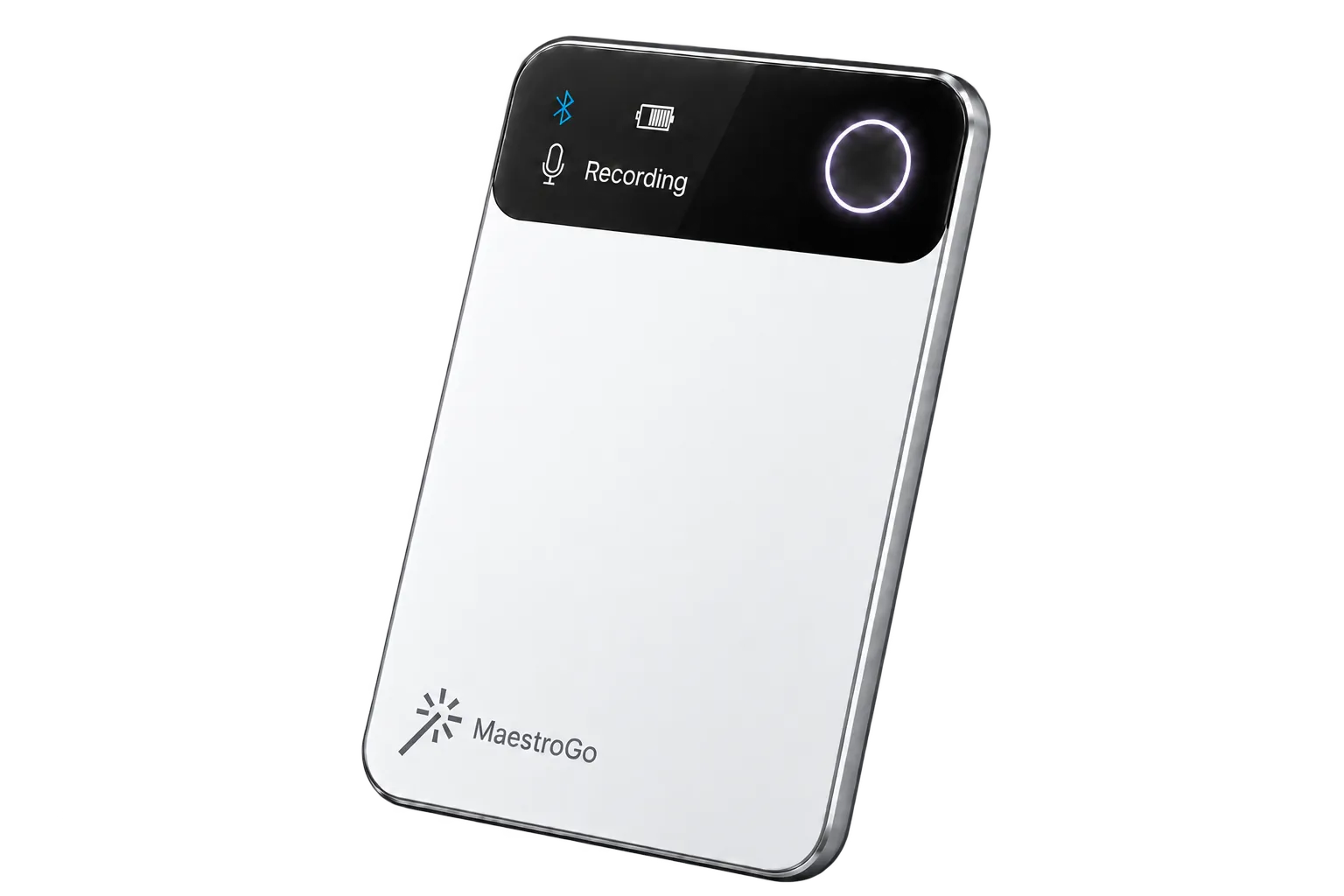
MaestroGo is the recorder we make. Like Pocket it is card-sized, sticks to your phone and charges over USB-C. It differs in three places: it detects calls on its own, it has a screen, and it joins your Teams, Zoom and Google Meet calls. Pocket wins on free transcription and languages.
| Updated November 2026 | Pocket$129 | MaestroGo$119 |
|---|---|---|
| Hardware | ||
| Weight | 52 g | 40 g |
| Microphones | 2 + contact mic | 4 + contact mic |
| Battery, maker's figure | Up to 4 days of active use | 40+ h continuous recording |
| Screen | No | Yes |
| Attaches to your phone | Magnetic back | Magnetic back |
| Charging | USB-C | USB-C |
| Storage | 64 GB | 64 GB |
| Recording | ||
| Meeting or call mode | Manual | Automatic |
| Teams, Zoom and Google Meet | Desktop app, betaRecords on your computer | A notetaker joins the call |
| Languages | 120+ Wins | 40+ |
| Plans and privacy | ||
| Free plan | Unlimited transcription WinsStandard accuracy, summaries kept 30 days | 300 min a monthPlus 5 online meetings, history kept |
| Paid plan, per year | $239.88 | $204* |
| Two years on the paid plan | $608.76 | $527* |
| SOC 2 Type II | Not published | Yes |
| Recordings used to train AI | Not without consent | Never |
| Returns | 30 days | 14 days |
Pocket figures from heypocket.com, MaestroGo figures MaestroLabs' own, both checked November 2026.
If you are also weighing other recorders, our Pocket comparison covers more devices.
One history for the room, the phone and the call
MaestroGo is the hardware half of TeamsMaestro, a meeting assistant that works inside Microsoft Teams.
- Every meeting in one place. A conversation recorded in the corridor sits next to the Teams call the notetaker joined, with the same summary and the same search.
- No second subscription. If you already use TeamsMaestro, the device works with the plan you have, including the free one.

Who should buy Pocket, and who should not
Pocket AI review: frequently asked questions
Is Pocket AI worth it?
Yes, if you record a lot of in-person conversations and phone calls and want to avoid a monthly fee. Pocket costs $129, and its free plan transcribes without a monthly limit in more than 120 languages. It is less convincing if you want to keep summaries for longer than 30 days, need the most accurate transcripts or automatic speaker names, or need a published security audit. Those cost $239.88 a year on Pocket Pro, or point to a different recorder such as MaestroGo.
Does Pocket AI require a subscription?
No. Pocket works without a subscription. The free plan includes unlimited transcription at standard accuracy, summaries that are kept for 30 days, three Ask Pocket chats a day, to-do lists and text export. Pocket Pro costs $19.99 a month billed yearly ($239.88 a year). It adds the highest-accuracy transcription, automatic speaker names, summaries kept for good, unlimited Ask Pocket, live transcription, 80+ templates and sync to Notion, Google Drive and OneDrive.
How much does Pocket AI cost per month?
Pocket costs $0 a month on the free plan, or $19.99 a month for Pocket Pro billed yearly ($239.88 a year). heypocket.com shows Pro only with yearly billing. The recorder itself is a one-time purchase of $129 on heypocket.com, and Pocket often runs promotions. A Business plan with HIPAA mode and admin controls is priced on request. Shipping is free.
How does Pocket AI work?
Pocket is a card-sized recorder that you attach to the back of your phone or put on a table. You press the side button to record a conversation, or switch it to call mode to record both sides of a phone call through its contact microphone. It stores audio on its own 64 GB, then syncs to the Pocket app, where Pocket's cloud writes a transcript, a summary and a to-do list. You can then ask questions about your recordings with Ask Pocket.
Is Pocket AI legit?
Yes. Pocket is made by Open Vision Engineering, a San Francisco company founded by Gabriel Dymowski and Akshay Narisetti and backed by Y Combinator. It raised $11 million in a round led by Accel in mid-2026, and heypocket.com says it has more than 400,000 customers. On Trustpilot it scores 4.8 out of 5 from about 7,900 reviews. The complaints that do come up are mostly about delivery times, support replies and the cost of Pocket Pro, not about the device failing to work.
Is Pocket AI safe to use?
Pocket says it encrypts data in transit and at rest and never sells personal data, and its privacy policy states that it will not use your recordings to train its models without your consent. It does not publish a SOC 2 or ISO 27001 audit, and its privacy policy does not say where data is processed or name its AI providers. A HIPAA mode with a business associate agreement is available on the Business plan. For confidential client or patient conversations, ask Pocket for its security documentation before you rely on it.
Can Pocket record phone calls?
Yes. Pocket has a contact microphone that picks up both sides of a call through the back of the phone, so it has to be attached to the phone by its magnetic back or the included adhesive mount. You switch to call mode yourself before you record. It does not detect a call on its own, unlike MaestroGo. Call recording is subject to consent laws that vary by state and country, so tell the other person.
Can Pocket record Zoom, Teams and Google Meet?
Yes, through the Pocket desktop app for Mac and Windows, which Pocket says is currently in beta. It records your microphone and the meeting's sound on your computer without adding a bot to the call, and can start automatically when it detects a meeting. It records audio only, not video or shared screens. The Pocket recorder itself does not join online meetings.
How long does the Pocket battery last?
Pocket states up to four days of active use on a charge and 1.5 hours to charge over USB-C. Pocket does not publish a figure in hours of continuous recording. Hands-on reviews report several days of a few hours of recording a day, and one reviewer describes a full working day of constant use. There is no battery indicator on the device itself, so you check the level in the app.
Pocket AI or Plaud: which is better?
Pocket is the cheaper option and Plaud the more polished device. Pocket's free plan has no monthly limit on transcription, while Plaud's stops at 300 minutes a month. Plaud's Note Pro has a screen and switches to call mode on its own. Our full comparison is at maestrolabs.com/plaud-vs-pocket.
What is the best alternative to Pocket AI?
It depends on what you want to change. MaestroGo, which we make, costs $119, detects phone calls on its own, has a screen, charges over USB-C, publishes a SOC 2 Type II audit and sends a notetaker to Teams, Zoom and Google Meet calls. It supports 40+ languages against Pocket's 120+, and its free plan stops at 300 minutes a month but keeps your history. If nearly all your meetings are video calls, a software notetaker is enough and you do not need a device.
MaestroGo: the Pocket alternative that detects calls and joins Teams, for $119
MaestroGo works with the free TeamsMaestro plan, so there is nothing else to pay until you need more than 300 minutes a month.
$119Order MaestroGo now- Free shipping in the US
- 1-year warranty
- 14-day returns
Pocket and HeyPocket are trademarks of their owner. Prices and plan details were checked on November 17, 2026 and may have changed.
* The MaestroGo unlimited plan is TeamsMaestro Pro, billed annually.