

 MailMaestro pricing
 TeamsMaestro pricing








Key Takeaways
- Fathom and TeamsMaestro both use a bot that joins your Teams call. The real difference is how each one gets there.
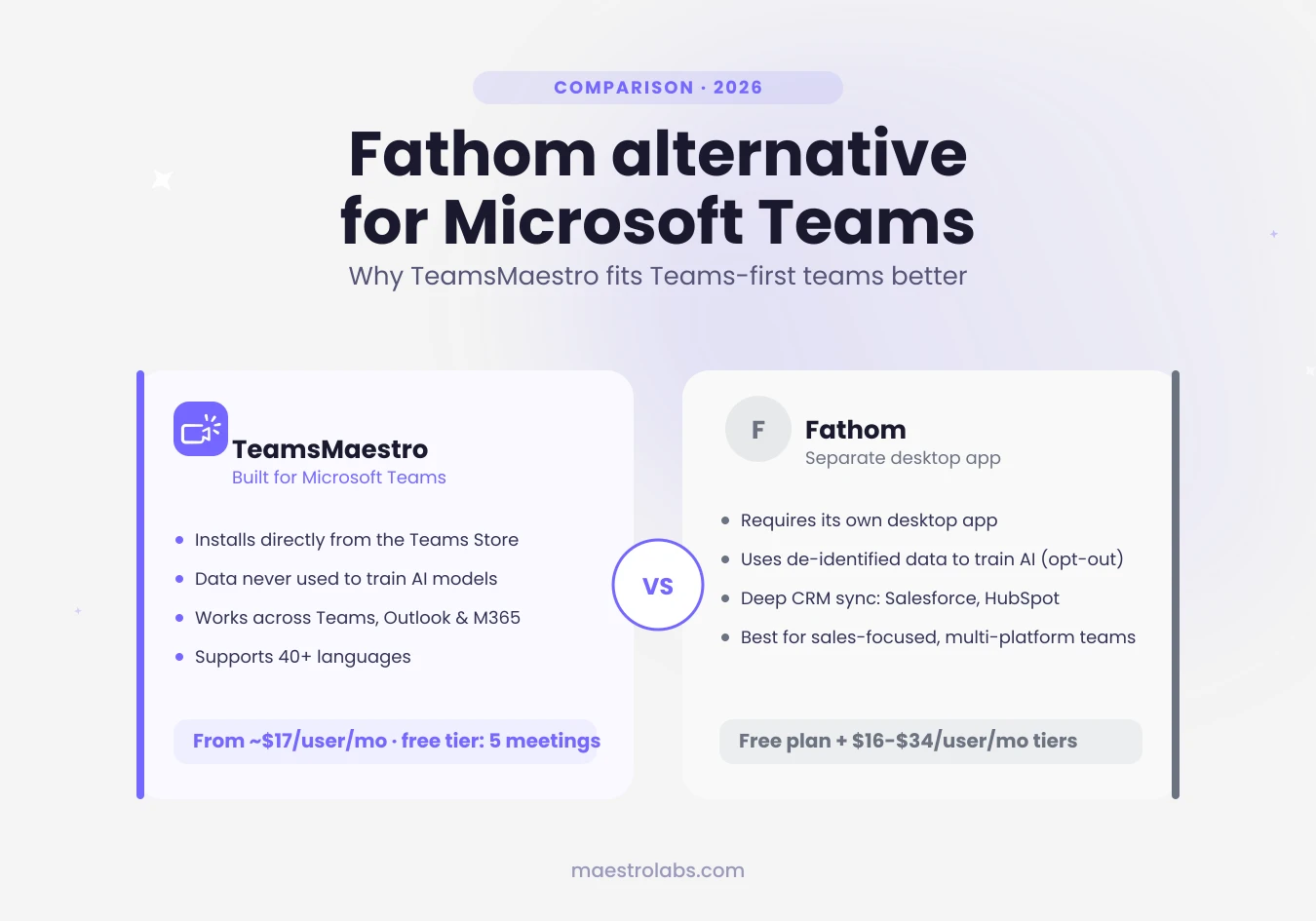
- TeamsMaestro installs directly from the Microsoft Teams Store. Fathom requires downloading and running its own separate desktop app.
- Both are SOC 2 Type II, GDPR, and HIPAA compliant. TeamsMaestro states your data is never used to train AI models, including its own. Fathom uses de-identified meeting data to train its own models by default, with an opt-out available.
- TeamsMaestro supports 40+ languages across Teams, Outlook, and Microsoft 365 from a single install.
- If your team lives in Teams, an app installed through the Teams Store is simpler to deploy and manage than a separate bot-based desktop tool.
Your team runs every meeting through Microsoft Teams, but the notetaker everyone recommends, Fathom, wasn't built to install directly inside Teams. To use it, you download Fathom's own desktop app, link your calendar, and let its bot join the call. It works. It's also one more piece of software running in the background of every meeting you have.
That's the real difference in this comparison. Fathom and TeamsMaestro both use a bot to capture your meeting. Fathom's bot comes from a separate desktop app you install and run yourself. TeamsMaestro's comes from an app you install directly from the Microsoft Teams Store, the same store your IT team already manages Teams app permissions through.
This article breaks down where each tool actually differs: how it gets installed, what it costs, how it handles your data, and what features you get for it.
Why installation is the real difference between Fathom and TeamsMaestro
Fathom's Teams support works by connecting to your Google or Microsoft calendar. It looks for meetings with a Teams link in the calendar location field, then joins as a bot, or captures audio directly from your device using its bot-free mode, which is currently in beta and limited to Mac. Either way, you need Fathom's own desktop app installed and running.
TeamsMaestro skips that step. It installs from the Microsoft Teams Store, the same certified app marketplace Microsoft reviews and that IT teams already use to manage what's allowed inside Teams. Once it's added, it works across Teams, Outlook, and Microsoft 365 on desktop, mobile, or web, all from that single install.
What Fathom does well
Fathom's summaries are genuinely strong, and its feature set goes deep for sales teams specifically: a conversational AI assistant you can ask questions of your call library, CRM field sync into Salesforce and HubSpot, coaching metrics, and a Deal View that rolls up every call tied to a deal. If your team is Zoom-first or spends a lot of time on sales calls, Fathom is a serious tool.
Where it's a harder fit for a Teams-first team: it isn't something IT can approve and distribute through the Teams Store the way they would any other Teams app. It's a separate desktop application that happens to also work with Teams.
TeamsMaestro: built for the Microsoft Teams Store
TeamsMaestro installs the same way any other Teams app does: through the Teams Store. There's no separate desktop application to distribute or manage. Once it's added, your notes are available across Teams, Outlook, and Microsoft 365, wherever you work.
It transcribes and summarizes your meeting, captures action items, and lets you pause the recording for off-the-record conversation without leaving the call. It also supports 40+ languages, so multilingual teams get summaries in the language they actually spoke.
TeamsMaestro is free to start, and it doesn't require a Microsoft 365 Copilot license. Copilot is a general-purpose assistant spread across every Microsoft app. TeamsMaestro is built for one job: meeting notes inside Teams, done well.
Fathom vs TeamsMaestro: side-by-side comparison
| Fathom | TeamsMaestro | |
|---|---|---|
| Teams integration and setup | Requires installing Fathom's separate desktop app and linking a Google or Microsoft calendar. Detects meetings with a Teams link, then joins as a bot, or uses bot-free audio capture (beta, Mac only). Not distributed through the Microsoft Teams Store. | Installs directly from the Microsoft Teams Store, an AppSource-listed, Microsoft-certified app, with no separate desktop app needed. One install gives you access across Teams, Outlook, and Microsoft 365 on desktop, mobile, and web. Joins automatically via calendar sync, or can be manually invited. |
| Price | Free: unlimited recordings and transcripts, no usage cap. Paid: Premium (individual) $16 to $20/user/month, Team $15 to $19/user/month (2-seat minimum), Business $25 to $34/user/month (2-seat minimum), Enterprise custom. | Free: 5 meetings and 5 AI summaries per month, 50 meetings stored. Professional $17 to $20/user/month. Enterprise custom. |
| Security, compliance, and AI training | SOC 2 Type II, GDPR, and HIPAA compliant. Uses de-identified customer meeting data to train Fathom's own AI models by default, with an opt-out available. Third-party AI vendors are barred from training on it. | SOC 2 Type II, GDPR, and HIPAA compliant (BAA on request), plus Microsoft Attested, Google Verified, and CASA Tier 2 Verified. States data is never used to train AI models, including its own. |
| Feature set | AI action items, conversational AI assistant (Ask Fathom), CRM field sync to Salesforce and HubSpot (Business+), coaching metrics, Deal View. | AI summaries and transcripts in 40+ languages, custom vocabulary (Professional), notes auto-emailed to attendees, notes stored in a Teams tab, can join meetings on your behalf when you're not present (Premium). |
The clearest split is installation and data policy. Both tools are built on a bot that joins your call, and both hold the same core compliance certifications. Where they diverge is how you get the tool onto your machine and into your meetings, and what each company does with your data once it's there.
Pricing
Fathom's free plan doesn't cap recordings or transcripts, though its more advanced summaries and features are reserved for paid tiers. Paid plans run from about $16 to $34 per user per month depending on the tier and billing cycle, with a 2-seat minimum on team plans.
TeamsMaestro's free plan covers 5 meetings and 5 AI summaries per month, with 50 meetings stored. Paid plans start around $17 to $20 per user per month. Neither requires a credit card to start.
Security, compliance, and how each one treats your data
Fathom and TeamsMaestro are both SOC 2 Type II, GDPR, and HIPAA compliant. On paper, their security certifications match.
The real difference is what each company does with your meeting content after it's collected. Fathom uses de-identified customer data to train its own AI models by default, though you can opt out in your account settings. TeamsMaestro states that your data is never used to train AI models, including its own. TeamsMaestro also carries Microsoft Attested and Google Verified status, platform-level checks Fathom's own materials don't reference.
Which one fits your team
If your team runs sales calls across Zoom and Teams and wants deep CRM sync, Fathom's feature set is built for that. It's a strong, proven product.
If your team lives in Microsoft Teams and wants an app that installs the way every other Teams app does, without a separate desktop application to manage, TeamsMaestro is the simpler fit. It comes through the Teams Store, works across Teams, Outlook, and Microsoft 365, and doesn't use your data to train any AI model.
TeamsMaestro takes the notes during your Teams call, installed the same way as any other Teams app. Try it free.
Lorem ipsum dolor sit amet, consectetur adipiscing elit. Suspendisse varius enim in eros elementum tristique. Duis cursus, mi quis viverra ornare, eros dolor interdum nulla, ut commodo diam libero vitae erat. Aenean faucibus nibh et justo cursus id rutrum lorem imperdiet. Nunc ut sem vitae risus tristique posuere.


follow-up on our previous call, ask if he’s ready to start cooperation let him know that our discount ends tomorrow ask him if he had time to calculate roi


